Tested on macOS 27 · October 2026
The best time tracking apps for Mac in 2026.
We put seven Mac time trackers through the same test on one Mac and read the makers’ pages for seven more. Here’s who each one suits, what it costs and where it falls short, our own Hourbloom included.
Updated 16 October 2026 · By Hourbloom
We make Hourbloom, one of the apps below. Every fact about the others comes from our test or from their makers’ pages, linked.
The short answer
- Best for freelancers who bill by the hour: Hourbloom, our app. It counts what you’ve earned today while the timer runs, with a rate for each project, free and without an account. In our test, Timemator and Toggl showed the amount only after the timer stopped.
- Best for tracking what’s billed and paid: Timemator, $39 once, with paid, billed and unbilled time in its reports.
- Best free plan for a team: Clockify, free for up to 5 users, or Toggl, up to 3; hourly rates are on their paid plans.
- Best for invoices: Qbserve, $29 once and all on your Mac, or Harvest, with invoices on its Free plan.
- Best automatic tracker: Timing, Mac only, from $9 a month.
- Best free and open source: ActivityWatch.
- Still on Klokki? It’s on hold, so plan your move.
How we tested
On 15–16 October 2026 we installed seven apps on one MacBook Pro (Apple silicon, macOS 27.0.1): Timing, Timemator, Toggl, Clockify, Harvest, Qbserve and ActivityWatch. Each came from its maker’s own site and was checked for Apple’s notarization before it ran. In each one we:
- noted what the first launch asks for: an account, permissions, settings switched on by default;
- made the same demo projects (Acme at $45 an hour, Nova at $60) and ran a timer;
- set an hourly rate and checked the amount after about a minute;
- looked at the menu bar, idle detection, exports and anything about invoices;
- removed the app and its data afterwards.
Where an app switched on tracking of apps and websites, iCloud sync or a calendar connection by default, we turned it off. We didn’t grant macOS accessibility permissions either, so the automatic trackers are judged on what they do before you give them more access.
Harvest’s Google sign-in didn’t complete, so we saw only its first screen. Toggl Track (classic), Timery, Tyme, Rize, Memtime and RescueTime come from their own pages and App Store listings, read on 16 October 2026. Prices are in US dollars, before tax.
All 15 at a glance
| Type | Account | Free | Paid from | Hourly rates | Invoices | How we checked | |
|---|---|---|---|---|---|---|---|
| Hourbloom (ours) | Timer, menu bar | None | Timer, rates, today’s earnings, CSV | Pro $4.99/mo, $29.99/yr or $59.99 once | Free | No | Our app |
| Toggl (new) | Timer + automatic | Required | Up to 3 users | Starter $9/user/mo yearly, $12 monthly | Starter and up | No | Hands-on |
| Toggl Track (classic) | Timer | Required | Free plan | Starter from $9/license/mo | Starter and up | — | Its pages |
| Clockify | Timer | Required | Up to 5 users | Basic $3.99/seat/mo yearly, $4.99 monthly | Basic and up | Standard and up | Hands-on |
| Harvest | Timer | Required | 1 seat, 2 projects | Teams $9/seat/mo yearly, $11 monthly | Yes | Yes, on Free too | First screen + its pages |
| Timemator | Timer + rules | None | 30-day trial | $39 once (2 Macs) | Yes | No | Hands-on |
| Tyme | Timer + places | None for one person | 14-day trial | $6.99/mo or $59.99/yr | Yes | Through exporters | Its pages |
| Timery | Timer (Toggl Track app) | Toggl Track | Free, limited | $0.99/mo or $9.99/yr | Toggl’s, paid | No | Its pages |
| Timing | Automatic + timers | Optional | 30-day trial | $9/mo yearly, $11 monthly | No | No | Hands-on |
| Qbserve | Automatic | None | 15-day trial | $29 once (5 Macs) | On invoices | Yes, PDF | Hands-on |
| ActivityWatch | Automatic | None | Free, open source | — | No | No | Hands-on |
| Rize | Automatic | Required | 7-day trial | $9.99/mo yearly, $12.99 monthly | Yes | Yes | Its pages |
| Memtime | Automatic | Required | 14-day trial | $14/user/mo yearly | Billable flag | No | Its pages |
| RescueTime | Automatic | Required | Lite: 2 weeks of history | $7/mo yearly, $9 monthly | Solo+ and up | No | Its pages |
| Klokki | Timer + rules | None | Klokki Slim is free | $30 once | Yes | No | On hold |
Timer apps for billing your hours
You start a timer for the task in front of you, so what gets recorded is what you’d bill. Most freelancers who charge by the hour start here.
Hourbloom (our app)
Best for freelancers who bill by the hour. No account · free core · Pro $4.99 a month
Hourbloom is a time tracker for Mac built around one question: how much have I earned today? The timer runs in the menu bar, and every project has its own hourly rate. One click opens a panel with today’s time and earnings, and the money grows while you work; you can put it in the menu bar itself, next to the time. A call on Zoom, Meet or Teams gets a task of its own, and if you step away with a timer running, Hourbloom asks what to do with that time. Entries stay in a folder on your Mac with a backup every day, and it imports CSV files from Toggl Track, Clockify, Harvest, Klokki and Timing.
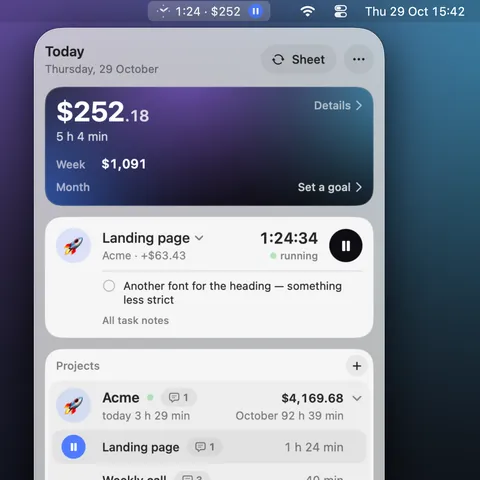
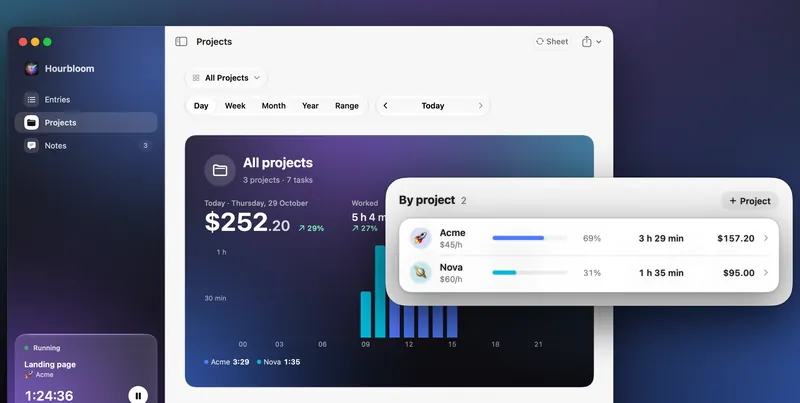
Honest limits: there are no Windows or phone apps, no teams, no invoices and no automatic tracking of apps and websites, and amounts are in US dollars only. A project’s rate applies to all of its time, past included; Toggl handles a rate change better.
Price: tracking, rates, today’s earnings and CSV export are free. Pro, $4.99 a month, $29.99 a year or $59.99 once, adds the client’s Google Sheet, call notes, reports for any period and client payments.
Toggl Track and the new Toggl
Best for working across Mac, phone and web. Account needed · free for up to 3 users · rates from Starter
Toggl now makes two time trackers. In September 2026 the new Toggl, with planning, time tracking and reports in one app, became its main product, and it’s what toggl.com offers for the Mac (Toggl). The classic Toggl Track Mac app is still in the Mac App Store and still supported.
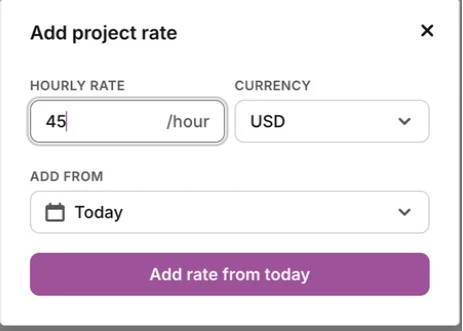
We tested the new Toggl. It opens to a sign-in screen; after sign-up, the whole product is unlocked for 30 days without a card. The menu bar shows the running timer or today’s total time. A project rate takes a currency and a start date, so a new rate doesn’t rewrite past entries. Once we stopped the timer, the report showed 0.85 USD for 1 minute 8 seconds at $45 an hour. Rates, the PDF, CSV and XLSX exports and most reports carry Toggl’s Premium star. Idle notifications are off by default (10 minutes once on), and there’s an optional rule-based autotracker.
Two things to know. Without internet, the new app turns timer actions off until you’re back online, its docs say, while classic Toggl Track stores entries locally and syncs later. And Toggl doesn’t make invoices: you export and use your invoicing tool.
Price: free for up to 3 users; Starter $9 a user a month billed yearly ($12 monthly), Premium $16 ($24) (pricing). Timery, a separate app for Toggl Track with a menu bar timer, costs $0.99 a month or $9.99 a year and needs a Toggl Track account.
Clockify
Best free plan for a team. Account needed · free for up to 5 users · rates from Basic
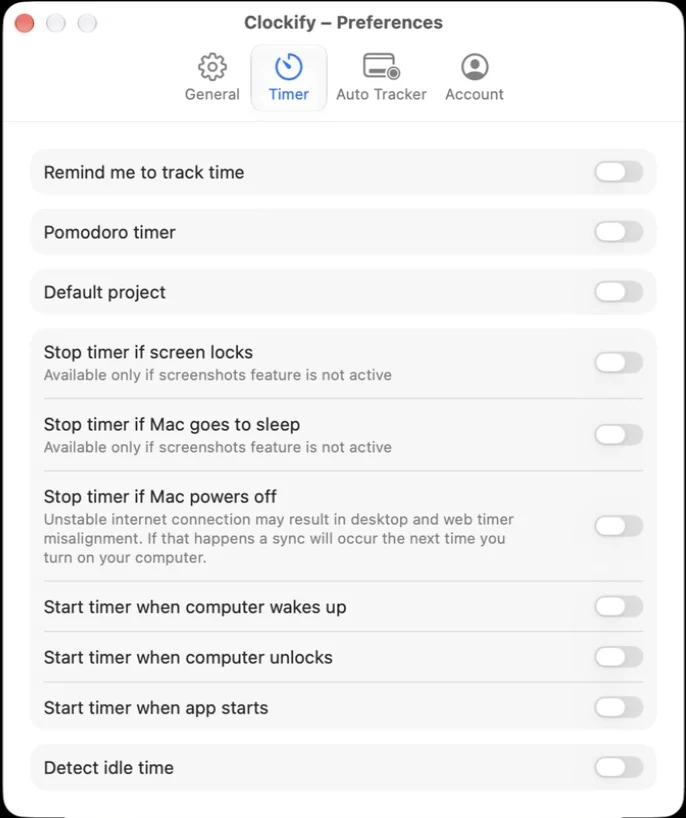
Clockify’s Free plan is generous with people and strict with money: no hourly rates, one month per report and PDF-only export. In our test the Mac app asked for an account first, then for our goal, team size and billing model, and opened with sample projects. A new project in the app has a name and a client but no rate field; rates are set in the web app, from Basic. Entries show a billable flag and a duration, not an amount. The menu bar shows only Clockify’s icon until you turn on “Show timer in status bar”. Idle detection and the auto tracker are in the preferences but off, and Clockify says both are missing from its Mac App Store version (Mac app help).
Price: free; Basic $3.99 a seat a month billed yearly ($4.99 monthly) adds rates; Standard $5.49 ($6.99) adds invoices (pricing). More in Clockify and Hourbloom side by side.
Harvest
Worth a look for invoices. Account needed · free for 1 seat and 2 projects · invoices included
Harvest is the one to look at if you want invoices from the same app: its Free plan already creates, sends and tracks invoices, for one seat and two projects (pricing). We only got as far as its sign-in screen, because the Google sign-in didn’t complete on our test Mac, so the rest comes from Harvest’s pages. Harvest says its desktop apps need an internet connection; its phone apps track offline.
Price: free; Teams $9 a seat a month billed yearly ($11 monthly).
Timemator
Best for tracking what’s billed and paid. No account · $39 once · rates and billing status
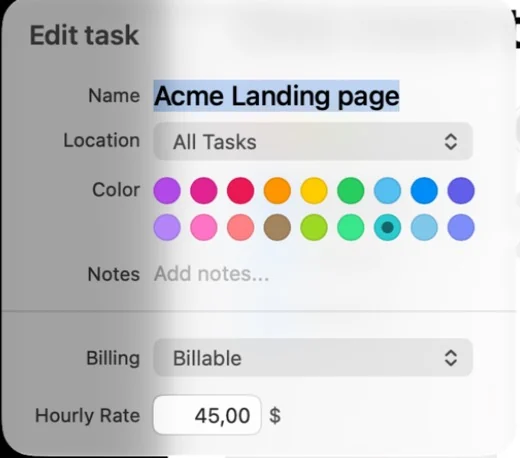
Timemator is the closest thing here to a classic Mac utility, with billing built in. It opens without an account into a 30-day trial. Its welcome screens switch on activity tracking, auto-tracking rules and iCloud sync by default; we turned all three off, since activity tracking records every app and site you use. The hourly rate lives on the task (Billing → Billable → Hourly Rate). While the timer ran, the entry said $0.00; 1 minute 6 seconds at $45 showed $0.83 once it stopped, and a changed rate repriced the entry already there. Reports mark time as paid, billed, unbilled or non-billable, and a CSV or PDF export can mark entries as billed. It pauses after 5 minutes idle. One catch: Escape closes the task editor without saving.
Price: $39 once for 2 Macs after a 30-day trial; the iPhone app is $7.99 on top (timemator.com).
Tyme
Worth a look for an all-Apple setup. No account for one person · 14-day trial · rates, no built-in invoices
Tyme is a native Mac app whose menu bar shows the running time, today’s total time and the current task. One person’s data stays in their own iCloud. It has project and task rates with rounding and billed and paid states, and it can start and stop timers when you arrive at or leave up to 20 places. It doesn’t log apps or websites, and invoices go through exporters such as GrandTotal or FreshBooks. We didn’t test Tyme hands-on for this update; this comes from its pricing and feature pages and App Store listing.
Price: $6.99 a month or $59.99 a year in the Mac App Store (€6.99 or €59.99 from its own site).
Klokki
On hold. No updates or support
Klokki and Klokki Slim still run, but their maker says development is on hold, with no updates or support (klokki.com); Klokki Slim was last updated on 3 May 2023. If you use it, export your history while it still opens: here’s how to move it to Hourbloom.
Automatic time trackers
These log the apps, windows and sites you use in the background, and you sort that time into projects later. They’re best for seeing where the day went; for billing, check what they do with rates.
Timing
Best automatic tracker. Account optional · 30-day trial · automatic, no hourly rates
Timing is the most complete automatic tracker for the Mac, and it stays Mac-only on purpose: it isn’t in the Mac App Store, because sandboxing would limit what it can track. On first launch it offers to start tracking at login and to ask about your time after video calls. An account is optional, for sync, backup and AI summaries, and can be skipped. For full detail it asks for the Device Control and Data Access permission, but even without it, it started logging app usage right away.
You drag that time onto projects, or start timers from the toolbar or the menu bar. We found no hourly rate anywhere: projects and Settings → Billing only set a billing status, and invoicing goes through GrandTotal. Reports export to Excel, CSV, PDF, HTML and JSON, with rounding. Idle time is cut after 3 minutes. After we quit the app, its helper kept running in the menu bar until we stopped it.
Price: Professional $9 a month billed yearly or $11 monthly; Expert $11 or $14; Connect $16 or $20 a user. A 30-day trial, no free plan (pricing).
Qbserve
Best for invoices without a subscription. No account · $29 once · invoices built in
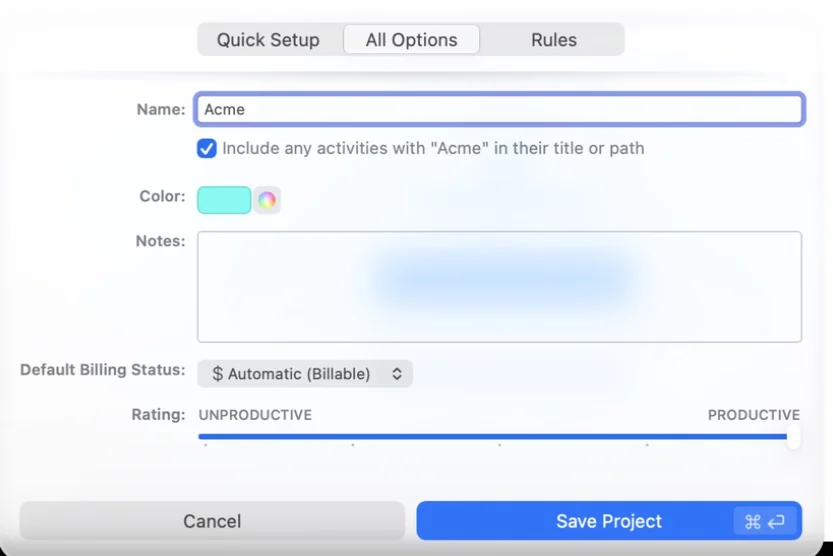
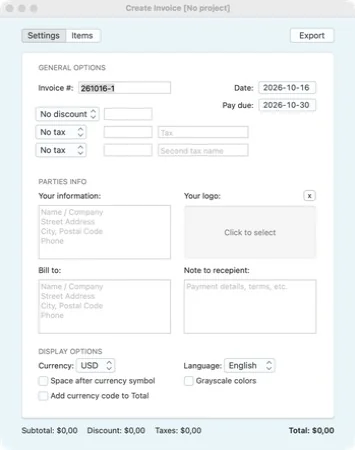
Qbserve tracks automatically and locally, and it’s the only automatic tracker here with real invoices. It needs no account and started recording the moment it opened, sorting apps into productive, neutral and distracting. Projects come from rules or from dragging activities onto them. Its invoice form has numbering, a due date, a discount, two taxes, your details and logo, the client’s details, currency and language, and lines with hours, rate and amount, or it pulls a project’s unbilled days. Data never leaves the Mac. The latest version, 1.91, is from July 2026.
Price: $29 once for up to 5 Macs, plus local VAT, after a 15-day trial (qotoqot.com).
ActivityWatch
Best free and open-source option. No account · free and open source · no rates
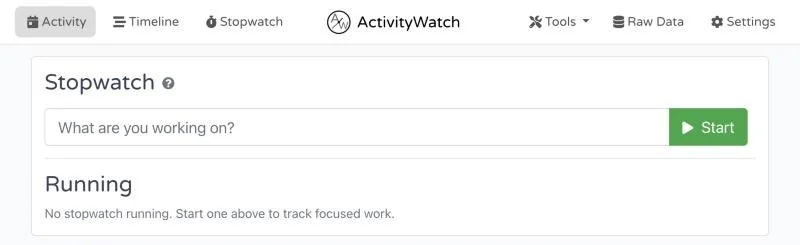
ActivityWatch is free, open source and private, since data stays on your Mac, but it isn’t a Mac app in the usual sense: a menu bar icon starts a local server, and everything else happens in your browser at localhost:5600. In our test, without the macOS permission to see windows, it recorded only whether we were at the Mac, and its app and window charts said a watcher was missing data. It has a simple stopwatch, no projects with rates and no invoices, and it exports JSON (activitywatch.net).
Price: free; an optional supporter subscription from $5 a month unlocks nothing.
Rize
Worth a look for focus sessions. Account needed · 7-day trial · rates and invoices
Rize tracks apps, window titles and sites automatically, adds focus sessions and, since August 2026, creates invoices from tracked time (docs). It’s a desktop app for Mac and Windows with a menu bar widget; it needs an account and syncs through its cloud. We didn’t test it hands-on.
Price: Basic $9.99 a month billed yearly ($12.99 monthly), Pro $23.99 ($28.99); no free plan (pricing).
Memtime
Worth a look for a private activity timeline. Account needed · 14-day trial · activity data stays on the Mac
Memtime records what you do on the computer and keeps that activity on the device (Memtime); you turn the timeline into time entries and send them on to project or billing tools. It needs an account, there’s no monthly billing, and checkout is in euros. We didn’t test it hands-on.
Price: Basic $14 a user a month billed yearly, $12 on a 2-year plan or $18 quarterly (pricing).
RescueTime
Worth a look for where your attention goes. Account needed · free Lite plan · billable rates on Solo+
RescueTime is about where your attention goes rather than billing. The free Lite plan tracks automatically but keeps two weeks of history and no offline time; paid plans add a timer, focus sessions, timesheets and, on Solo+, billable rates. Data lives in its cloud. We didn’t test it hands-on.
Price: Solo $7 a month billed yearly ($9 monthly), Solo+ $12 ($15) (pricing).
Also on other lists
Jibble is free for unlimited users and lists screenshot capture, which makes it a tool for teams and employers more than for one freelancer; it needs an account and comes from the Mac App Store. TMetric is free for up to 2 seats in one desktop app for Mac, Windows and Linux. We didn’t test either.
Questions about Mac time trackers.
Is there a free time tracker for Mac?
Yes. In Hourbloom, our app, the timer, hourly rates, today’s earnings and CSV export are free, with no account. ActivityWatch is free and open source but has no rates. Clockify (up to 5 users) and Toggl (up to 3) have free plans that need an account and keep hourly rates for paid plans. RescueTime Lite is free with two weeks of history.
Which Mac time trackers work without an account?
Hourbloom, Timemator, Qbserve and ActivityWatch need none, Timing’s account is optional, and Tyme keeps one person’s data in their iCloud. Toggl, Clockify, Harvest, Rize, Memtime and RescueTime all need one.
Automatic or timer-based: which do I need?
Automatic trackers (Timing, Qbserve, Rize, Memtime, RescueTime, ActivityWatch) log the apps and sites you use and let you sort them later, which is good for seeing where the day went. Timer-based ones (Hourbloom, Toggl, Clockify, Harvest, Timemator, Tyme) record only what you start, which is clearer when you bill a client. Some mix both: Toggl and Timemator have rules, and Timing has timers.
Which time trackers work offline on a Mac?
Hourbloom, Timemator, Qbserve and ActivityWatch keep everything on the Mac. Classic Toggl Track and Clockify track offline and sync later, though Clockify can’t create projects offline. The new Toggl turns timer actions off without internet, and Harvest’s desktop apps need a connection.
Does the Mac have a built-in time tracker?
Screen Time in System Settings shows how long you used each app and website, but it has no projects, clients, rates or exports, so it can’t stand in for a time tracker when you bill by the hour.
Which one is best for freelancers who bill by the hour?
Pick by how you bill. To see what you’ve earned while you work, with rates and no account: Hourbloom, our app, or Timemator, $39 once. For invoices from the tracker: Qbserve or Harvest. For a free plan on your phone too: Toggl or Clockify, with rates on their paid plans.
Is Klokki discontinued?
Klokki’s site says its development is on hold: Klokki and Klokki Slim stay available as they are, with no updates or support. How to move your Klokki history.
Why is Hourbloom on this list?
Because we make it. It’s described with its limits, and every fact about the other apps comes from our test on 15–16 October 2026 or from their makers’ pages, linked in each section.
Make every hour count.
Hourbloom is a menu bar time tracker for freelancers who bill by the hour.
macOS 14 Sonoma or later · English and Ukrainian